
AI chatbots for small businesses: what they can (and can't) do
An AI chatbot for a small business is an assistant on your website, Facebook Page or WhatsApp that replies to customers straight away. It answers common questions from information you've given it, collects details from new enquiries and, if you want, books people in. Then it passes anything it isn't sure about to you. Set up well, it means fewer missed enquiries and less time typing the same answers. Set up badly, it's an annoying robot that guesses.
This guide explains what a chatbot is genuinely good for, where it shouldn't be trusted, and how to set one up so it helps your customers rather than frustrating them.
Why small businesses are looking at chatbots
If you run a small business or a trade, you probably can't reply to every message the moment it arrives. You're on a job, with a client, driving, or it's late at night. Meanwhile customers expect a quick answer, and if they don't get one they often message the next business on the list.
A chatbot doesn't replace you. It covers the gap between a message arriving and you being free to deal with it properly.
What an AI chatbot can do well
1. Answer the questions you get every week
Opening hours, areas you cover, what services you offer, whether you do evening appointments, how to get a quote, where to park. If you've written the answer down once, the assistant can give it at 2am as reliably as at 2pm.
2. Collect the details of new enquiries
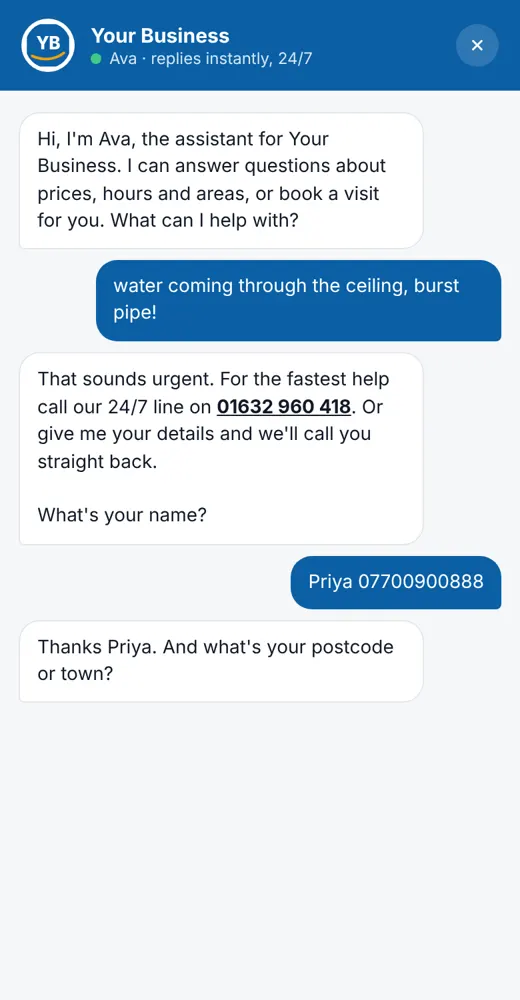
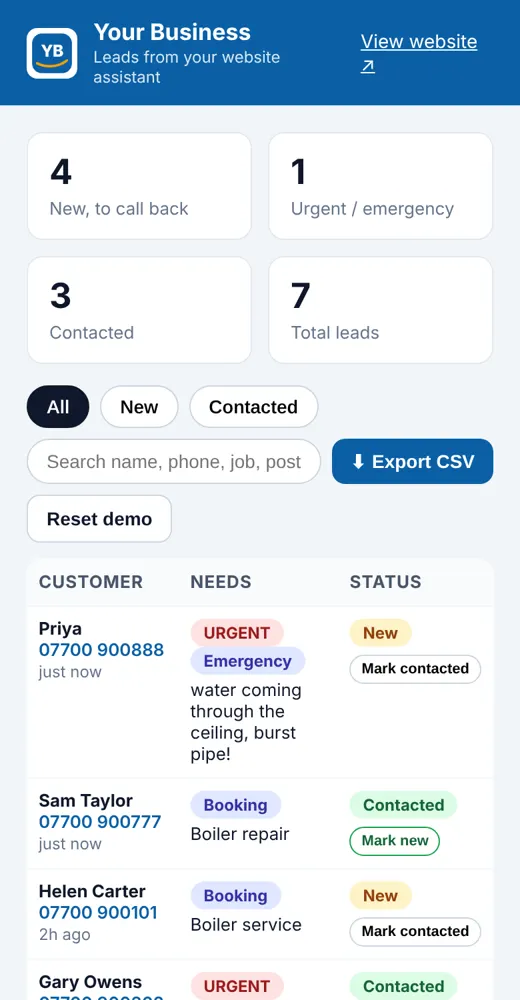
Instead of "Hi, can you ring me?", the assistant asks for the basics: name, phone, postcode, what the job is, photos, and when they need it. You get one tidy summary instead of a five-message back-and-forth.
3. Take bookings
Connected to your diary or booking app, an assistant can offer real free slots, book the customer in and confirm. It suits salons, barbers, groomers, therapists and trades booking site visits. (More on booking apps in our salon booking app guide.)
4. Flag urgent jobs
For trades, an assistant can spot words like "leak", "no heating" or "flooding" and tell the customer to ring you straight away, or alert you right away, rather than queuing it with routine enquiries.
5. Work where your customers already message you
Chat on your website, Facebook Messenger, and WhatsApp Business. Customers don't need to download anything.
What a chatbot shouldn't do
This is the part that matters most. A good assistant knows its limits:
- Don't let it make up prices or promises. If a customer asks for a quote, the assistant should collect the details and hand over to you, not guess a figure.
- Don't let it handle complaints alone. An unhappy customer needs a person. The assistant should apologise, collect the details and pass it straight to you.
- Don't pretend it's a person. Tell customers they're chatting with an assistant and how to reach a human. It's honest, and people mind far less than you might think.
- Don't let it guess. If the answer isn't in what you've given it, it should say "I'll check with the team" and pass it on.
- Don't let it give advice it isn't qualified to give, such as safety, legal or medical advice.
AI tools can occasionally get things wrong, which is exactly why these rules matter. The safest set-up is one that answers from your information and hands over everything else.
Customer data: the bit people forget
A chatbot collects personal data: names, phone numbers, addresses, sometimes photos of people's homes. Under UK data protection law you need to:
- Tell people what you collect and why (update your privacy notice).
- Only collect what you need for the enquiry.
- Keep it secure and decide how long you keep it.
- Know where the chatbot provider stores and processes the data.
The ICO publishes guidance on AI and data protection that's worth a read. [1] If you're not sure, ask whoever builds your assistant to explain exactly where the data goes.
Off-the-shelf chatbot builder or one set up for you?
There are lots of chatbot builders aimed at small businesses, and AI receptionist services for trades that answer missed calls. They're quick to try, and many have free trials.
Things to check whichever way you go:
- Where does it get its answers from? Your own FAQ, website or documents, or the open internet? Your own information is safer.
- How does handover work? When it isn't sure, how quickly does the question reach you, and does it include the conversation so far?
- Which channels does it cover? Website, Messenger, WhatsApp, phone?
- Can it connect to your diary or job system to take real bookings?
- How easy is it to update? Prices, hours and services change. You should be able to change the answers yourself.
- What happens to your data? See above.
Setting a chatbot up yourself is fine if you're comfortable with the tech and your needs are simple. If you'd rather it was set up for you, connected to your booking app or job sheets, written in your tone of voice and tested properly before it talks to customers, that's where a done-for-you build helps.
At ALM Media Design we set up AI chatbots for small businesses and trades anywhere in the UK, with the demo and set-up done online: customer-reply and FAQ assistants, booking assistants, and enquiry bots that send you a tidy summary. Each one works from your own answers and passes anything it's unsure about to you. We can also join it up with automations like follow-ups, reminders and review requests.
How to get started (without overthinking it)
- List your top 15 questions. Look through recent messages and emails. These become the assistant's first answers.
- Decide what it should collect for a new enquiry or booking.
- Write the handover rules: what it must always pass to you (complaints, quotes, anything urgent).
- Start on one channel, usually your website or Facebook Page.
- Read the conversations for the first couple of weeks and improve the answers.
- Then add more: bookings, WhatsApp, follow-up automations.
Frequently asked questions
Will an AI chatbot replace my receptionist or me? No. It handles the routine questions and collects details so you can reply faster and better. People still handle quotes, complaints and anything unusual.
Can it answer the phone? Some AI receptionist services answer or text back missed calls. A chat assistant works in messages. Which suits you depends on how customers usually get in touch.
Will it give customers wrong answers? It can happen with any AI tool, which is why it should only answer from information you've approved and hand over anything else. You should be able to read the conversations and correct the answers.
Does it work on Facebook and WhatsApp? Yes, assistants can work in Facebook Messenger and WhatsApp Business as well as on your website, though each channel has its own set-up steps and rules.
Do I need to tell customers it's a bot? We recommend it. A short line like "I'm the assistant for [your business]. I can answer common questions or pass you to the team" builds trust.
Do you work with businesses anywhere in the UK? Yes. We set up assistants for small businesses and trades right across the UK. Everything, from the demo to testing and changes, is done online.
Can I try one before deciding? Yes. We'll set up a free demo assistant with your business name and a few of your real FAQs, so you can see how it answers.
See an AI assistant for your business
Tell us the questions you answer every day and where your customers message you. We'll send a free quote and a free demo assistant with your business name on it. No obligation, no hard sell.
Get a free quote & demo or message us on Facebook.
Sources
- ICO: Guidance on AI and data protection.: https://ico.org.uk/for-organisations/uk-gdpr-guidance-and-resources/artificial-intelligence/guidance-on-ai-and-data-protection/
- Free demo before you payWe show you a working demo with your branding first.
- UK-basedWorking with small businesses and trades UK wide.
- Fixed price, quoted up frontAgreed in writing before any work starts.
- See it before you askBrowse the example demos on this site.
Get a free quote & demo
Tell us about your business and what you need. We work with small businesses and trades UK wide, and we'll come back with a clear fixed quote and, where it makes sense, a free working demo with your own name, logo and colours.